SOL-File Editor
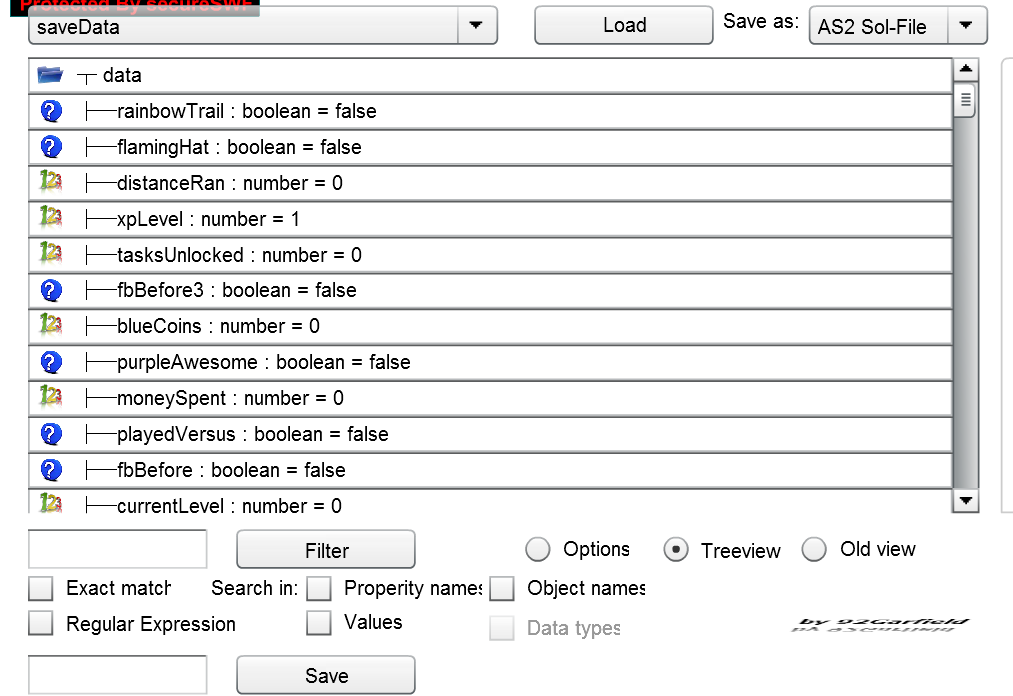
Usuage:
Open SOL editor.swf (from hard drive in FireFox or FlashPlayer stand alone).
Copy SOL-File from original directory to the one of SOL Editor.swf.
Load SOL file by entering name without extension into box and clicking Load button.
Edit the entry you like by changing it’s value displayed in the box on the bottom an clicking Save.
Optional: Make backup
Copy, Paste and overwrite old .sol file.
(someone make video tutorial please, I’m limited by traffic limited internet)
Makeing Backup:
copy .sol file
or
(only when winrar is installed) right click it and click “Add filename.rar to archieve” to restore you right click the .rar and press extract here
Features:
As far as I know, it can read and edit any .sol files.
Shows variable types.
Sets Numbers as Numbers / Strings as Strings.
Saves the filenames of loaded .sol files, no double entrys (saves when load button is clicked).
Removes “.sol” extension if needed.
Treeview with icons for variable types.
Boolean values can be toggled, you don’t have to type 0/1, true/false and are saved after beeing toggled.
Filter for values, object names or properity names.
Filter using regular expressions.
Choose which SOL-File format should be used for saveing.
Filters:
Will filter for the text in the textbox when the button is clicked.
Exact match means:
e.g.: “name” will not match “names” or “charname”
without exact match it’s like
searchtext in windows search or
/.searchtext./
e.g.: “name” will match “names”, “nameclass”, “mynameclass”, …
It’s always case sensitive at the moment, meaning “name” will never match “Name”.
Search in: (highlited text is searched)
properity: my.char.name.str
object: my.char.name.str (the dots aren’t matched)
values: it’s clear I think, the values
Regular Exprssion filter search whole paths when searching in object:
example: /my.char/ will be found in my.char.name
Options:
[NOTE: ONLY TO BE MODIFIED BY ADVANCED USERS]
They have to be saved in a SOL file either way, and this is a SOL editor, so it’s obvious I don’t need a real panel for it right?
curVersion:
Indicates the version you are using, set to any other value to reset option on next startup.
show_Variable_type_text:
Indicates whether to display the variable type behind variables seperated by » : «.
show_Values:
indicates whether to display the values behind properity/type separated by » = «.
Trouble:
AS3 stores SOL files much more compressed it seems, therefore, AS2 will not be able to read them once edited, easy to see when it was AS2 before as the file size greatly decreases (17-> 6kb, 70b -> 60b somewhere about that).
Solution?
Save in AS2 Sol-File format as AS3 does read them exactly the same and therefore AS3 games will load AS2 Sol files without problems (I tested it).
When you are sure the game is AS3, you should still use AS3 Sol-File format as I think it got other advantages then just the files size i diddn’t figure yet.
Categories and tags of the game : Single Player, Utility
💡 Dato Tecnológico
La telefonía IP es el estándar empresarial. Las centralitas virtuales VoIP permiten a las empresas gestionar llamadas de clientes desde cualquier lugar con conexión a internet.